Option Signals -Picker Alerter
- 4.3
- Rating
- 1.00M
- Installs
- Free
- Price

 Analysis by App-foxy
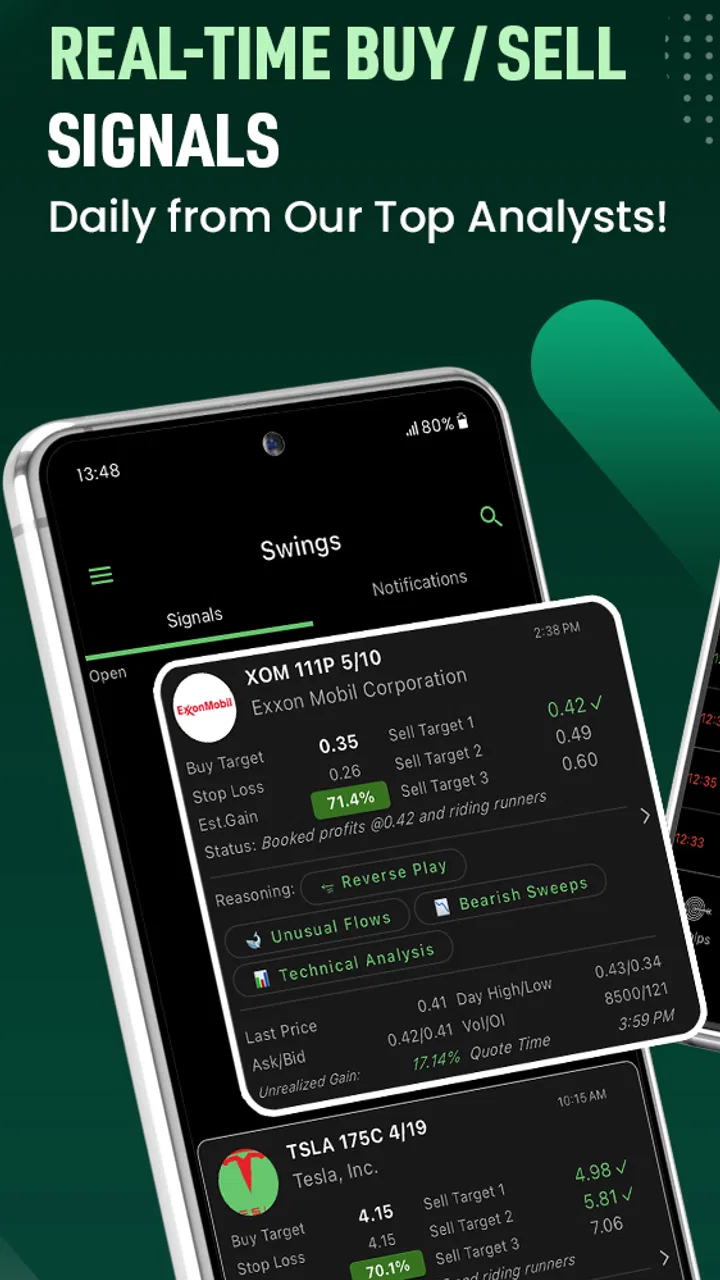
Option Signals -Picker Alerter is a finance app built around a very specific need: helping users watch for buy and sell signals connected with call and put options. After spending time with it, my main impression is that it works best as a market-monitoring companion rather than a complete replacement for research, charting, or a carefully written trading plan. It can make an options-focused workflow more alert and organized, but it does not remove the difficult decisions that come after a signal appears.
The app is free to install, which makes it easy to test without committing money at the beginning. Its audience is broad enough to include anyone interested in options, since the content rating is Everyone, but the subject itself is not beginner-friendly in the same way a general budgeting app is. A signal can point toward a possible direction; it cannot tell me whether the trade fits my risk tolerance, account size, time horizon, or understanding of the underlying stock.
That distinction shapes my recommendation. If you already know the difference between calls and puts and want a quicker way to notice market activity, this app is worth exploring. If you are hoping for automatic profits or a simple answer to “what should I buy right now?”, I would be cautious. The useful part is the alerting perspective, while the responsibility for interpretation remains firmly with the user.
You May Also Like

 Blood Strike: 2.5 Anniversary
Blood Strike’s Loadouts Turn Every Drop Into a Tactical Gamble
A close look at Blood Strike’s custom loadouts: how fast access to signature weapons reshapes its battle royale rhythm, rewards preparation, and narrows the gap between fights.

 Pandora - Music & Podcasts
Pandora’s Music Is Easy to Start, but Harder to Recover
Pandora’s strength is its low-effort path from a seed to a station. Its weak spot is how much confidence it asks you to place in connection, setup, and quiet recovery.

 8 Ball Pool
 Is Built on Rivalries, Rematches, and Routine
A close look at the rivalries, rematches, shared routines, and unanswered safety questions that turn a quick pool match into a persistent mobile community.

 Samsung Music
’s Quiet Strength Is Playing What You Already Own
Its reach comes less from spectacle than from dependable access to a personal library. That simplicity is both the app’s strongest retention engine and its ceiling.

 AccuWeather: Weather Radar
AccuWeather Review: A Quick, Clear Forecast for Everyday Decisions
For everyday plans, the best forecast is the one you can understand quickly. AccuWeather makes rain timing, radar, and local conditions easy to act on, with a few trade-offs.

 Hill Climb Racing
Why Hill Climb Racing Still Turns Crashes Into One More Run
A tiny car, a bumpy hill and one more upgrade: Hill Climb Racing keeps resurfacing because its simple chaos makes every near-miss feel personal.
More From Our News Desk



How the signal-focused approach feels in practice
The application is developed by Gamma Greeks: AI Stock Option Signals, Flow Alerts, and it sits in the finance category with a clear options-first identity. Instead of trying to be a full personal finance suite, it concentrates on market trend signals for calls and puts. That narrower purpose is helpful because the interface and the information are meant to support a particular kind of decision rather than mixing investing with banking, spending, or portfolio administration.
In my experience, the first useful habit is to treat the app as an inbox for ideas. I would check the alerts, note which underlying asset and option direction caught my attention, and then move to a separate source for confirmation. That second step matters. A signal is a starting point for investigation, not a complete explanation of why a trade may work.
A practical example would be a busy weekday when I have only a few minutes during a lunch break. I might see an alert suggesting interest in a call option, record the time, and then check the underlying stock’s recent movement, upcoming events, spread, and expiration details elsewhere. If the option looks too expensive or the market has already moved sharply, I can reject the idea instead of chasing it. The app saves attention, but it does not replace judgment.
That workflow also exposes one of the app’s strongest qualities: it encourages me to notice opportunities I might otherwise miss. Options markets move quickly, and manually scanning every possible contract can be exhausting. A focused signal tool gives me a narrower place to begin. For a user who already has a watchlist and a defined process, that can be more useful than opening a general market app and searching without a clear question.
Where it adds value beyond a normal market app
Most ordinary investing apps are designed around holdings, watchlists, quotes, and order execution. They may show options chains, but options information is often one feature among many. Option Signals -Picker Alerter approaches the problem from the opposite direction: it puts potential options activity and directional signals at the center of the experience.
That difference is meaningful for someone who does not want to scroll through unrelated portfolio screens before reaching the information they care about. The app’s market-trend orientation also gives the user a way to organize research around a possible bullish or bearish idea. I found that more efficient than starting with a random list of contracts and trying to invent a thesis afterward.
There is an important trade-off, though. A general brokerage app usually has the account context needed to place an order, review buying power, and inspect the exact contract before execution. A signal app is better at prompting attention, while the brokerage remains better for the final operational checks. I would not want to make a trade from a notification alone, because the contract details can change the risk dramatically even when the broad direction looks attractive.
The app is also more useful when I define rules before opening it. For example, I might decide that I will not consider an alert unless the underlying asset is already on my watchlist, the option has a reasonable expiration for my strategy, and I can explain the maximum possible loss in plain language. This turns the signal from an impulse trigger into a screening step. That is one of the most valuable ways to use a tool like this.
Three habits that make the alerts more useful
First, I would keep a simple record of every alert I investigate, including the time I saw it, the direction suggested, the contract I examined, and the reason I did or did not act. This is not busywork. It helps separate the quality of the signal from the quality of my reaction. A missed trade may be less important than discovering that I repeatedly enter after a move has already happened.
Second, I would compare the alert with the underlying asset rather than focusing only on the option symbol. Options are affected by more than direction. Time remaining, implied volatility, liquidity, and the distance from the strike can all change the outcome. Even a correct view on the stock can produce a poor option trade if the contract is too expensive or loses value too quickly.
Third, I would use the app at scheduled times instead of allowing every notification to dictate my attention. Real-time information sounds attractive, but constant checking can encourage overtrading. A disciplined user can review signals, filter them against a plan, and then close the app. The same feature that helps a prepared trader stay informed can make an unprepared trader restless.
These habits are not advertised as magic functions, and they are not substitutes for missing market knowledge. They are ways I would place the app inside a safer routine. The strongest benefit comes from reducing the time needed to find ideas, not from turning uncertain ideas into guaranteed decisions.
The weakness: a signal can feel more complete than it really is
The central limitation is built into the concept. A buy or sell signal can look decisive even when the underlying evidence is complicated. The short wording of an alert may encourage a quick emotional response, particularly when the market is moving fast. For a newcomer, that presentation can blur the difference between “worth researching” and “appropriate to trade.”
I would also be careful about timing. In options, an alert that arrives after a sharp move may be less useful than it first appears. The contract may already reflect the news or momentum that created the signal. Entering late can mean paying more for the option while leaving less room for the expected move. This is why I would never judge the app by whether an alert sounds convincing in isolation; I would judge it by whether it fits a complete, pre-defined process.
Another source of friction is the need to move between tools. The app can point me toward an idea, but I still need a broker or market reference for execution and a broader research source for context. That is normal for a specialized product, yet it means the experience is not as self-contained as a beginner may expect. Users looking for one application that handles education, analysis, portfolio tracking, and trading may prefer a broader platform.
The commercial model should also be considered before relying on the app regularly. It is free to download, while in-app purchases range from $11.99 to $299.99 per item. I would begin with the free experience and decide whether the information genuinely improves my process before paying for anything. A premium signal feed is only worthwhile if it leads to better filtering and discipline, not simply more alerts.
The current version is 3.3.3, and the app supports devices running Android 7.1 or later. Those details make it accessible to people using older compatible Android hardware, although the practical experience will still depend on the phone and the user’s notification habits. I would check that alerts are allowed and that the device is configured sensibly, because a signal tool loses much of its purpose if notifications are delayed or ignored.
Who should use it, and who should skip it?
I see the best fit as an intermediate options learner or an active trader who already understands basic contract mechanics. This person does not need the app to explain every term from the beginning. Instead, they want a focused stream of possible bullish or bearish ideas and are comfortable checking the details elsewhere before acting.
It can also suit a cautious investor who uses options selectively and wants a second source of ideas. In that case, I would keep position sizes small, compare each alert with an existing thesis, and use the app as a research prompt. The tool is particularly reasonable for someone who already maintains a watchlist and wants to reduce the time spent searching manually.
I would not recommend making it the first and only options resource for a complete beginner. Before following any call or put signal, a new user should understand the maximum loss, expiration, strike price, assignment risk, and the effect of time decay. Without that foundation, the alert may create confidence without comprehension. A slower educational platform or a broker with strong contract explanations would be a better first step.
It is also a poor match for someone who wants long-term portfolio management rather than short-term market ideas. The app’s purpose is narrow, and that is both its appeal and its boundary. If my main goal were budgeting, retirement planning, dividend tracking, or automatic investing, I would choose a different category of application instead of forcing this one to do a job it was not designed for.
The public response suggests that the app has reached a substantial audience: it has more than a million installs, an average rating of 4.3 from around nine and a half thousand ratings, and 223 written reviews. I read those figures as evidence of interest rather than proof that every alert will suit every strategy. Popularity can show that the concept resonates, but it cannot measure whether the app matches my risk controls or trading style.
How I would test it without letting it control my decisions
I would start by observing rather than trading. For several sessions, I would note the alerts, record what happened afterward, and compare the timing with the underlying asset. This creates a personal sample of how the information fits my routine. I would not treat that observation period as a performance guarantee; its purpose is to reveal whether the alerts arrive early enough and whether I can interpret them consistently.
Next, I would create a checklist with only a few non-negotiable questions: What is the thesis? What would invalidate it? How much can I lose? Is the contract liquid enough for my plan? Am I acting because the setup makes sense, or because the alert made me feel late? If I cannot answer those questions, the correct action is to pass.
Finally, I would compare the app with my usual alternative. If a brokerage watchlist already gives me timely options-chain information and I prefer doing my own scanning, the extra signal layer may not justify a purchase. If manual scanning takes too long and the alerts help me find candidates without replacing my analysis, the app earns a clearer role. The deciding factor is not the number of notifications; it is whether the workflow becomes more deliberate.
That testing approach also answers a common concern: whether a user needs to pay immediately. I would say no. Because the app is free to install, I would first learn how the basic experience fits my process. Only after identifying a specific limitation and deciding that a paid option would solve it would I consider an in-app purchase. Paying for more information before knowing how to filter it is usually the wrong order.
My final assessment
After reviewing it as a finance tool, I see Option Signals -Picker Alerter as a specialized alerting companion with a useful but limited job. Its focus on call and put signals can make options research feel less scattered, especially for users who already know what they are looking for. The free entry point and broad device support make experimentation straightforward, while the large install base shows that the idea has found a real audience.
My reservation is equally clear: the app can highlight a possibility, but it cannot supply the full context needed for a responsible trade. I would pair it with a brokerage account, independent market research, and written risk rules. I would also resist paying for additional information until the basic workflow proves that it improves my decisions rather than increasing my urge to trade.
For an experienced or developing options trader, I think it is worth trying as a focused source of ideas. For a complete beginner, I would learn the mechanics first and use this only after understanding what each signal means in practice. The best way to use it is as a filter for attention, not as an autopilot for money. With that expectation, it can add speed and structure; without it, the same alerts may encourage decisions that the app was never able to evaluate for me.
FAQs for Option Signals -Picker Alerter
01What is Option Signals - Picker Alerter?
Option Signals - Picker Alerter is a mobile application designed to help users make informed decisions in the stock market. It provides real-time alerts and signals for options trading, aiming to guide both novice and experienced traders in executing successful trades by analyzing market trends and data.
02How does the app generate its trading signals?
The app uses advanced algorithms and data analytics to monitor market trends and fluctuations. By analyzing historical data, current market conditions, and various financial indicators, it generates signals that suggest potential trading opportunities. This allows users to make data-driven decisions rather than relying solely on intuition.
03Is Option Signals - Picker Alerter suitable for beginners?
Yes, the app is designed to accommodate both beginners and experienced traders. It provides educational resources and easy-to-understand signals that can help newcomers grasp the basics of options trading. Additionally, its user-friendly interface ensures that even those new to trading can navigate the app with ease.
04What platforms is the app available on?
Option Signals - Picker Alerter is available for both Android and iOS devices. Users can download it from the Google Play Store or the Apple App Store, ensuring wide accessibility across different mobile platforms. Regular updates ensure compatibility with the latest operating systems.
05Are there any subscription fees for using the app?
The app offers both free and premium subscription models. The free version provides basic signals and alerts, while the premium version includes advanced features such as detailed analytics, personalized support, and more frequent updates. Users can choose the subscription that best fits their trading needs and budget.
Pros
- User-friendly interface for easy navigation
- Real-time alerts for timely decisions
- Customizable settings to suit preferences
- Comprehensive market analysis tools
- Supports multiple languages for inclusivity
Cons
- Requires constant internet connection
- Limited features in free version
- Occasional lag in data updates
- Notifications can be overwhelming
- No dark mode option available

Option Signals -Picker Alerter
Gallery